Survey design
Build an instrument your team can test, review and reuse
Create questionnaires with branching, piping, randomisation, quotas, computed values and version history, without separating the design logic from the people who review and operate it.

Most survey tools treat an instrument as a flat list of fields. FlexiSurvey treats it as a research artifact: a structured questionnaire with branching logic, computed variables, sampling controls and a versioned edit history, all authored in one builder. That difference matters when the instrument has to hold up to a donor review, an ethics board or a multi-wave panel rather than a one-off web form.
It is built for the people who actually own the instrument, M&E officers, principal investigators, research managers and field-ops coordinators, and for the way they work: clone a template or a whole pre-wired project blueprint, branch on any prior answer, hold a representative sample with quotas, hand the right slice to a translator, and launch behind a shareable preview. Mobile delivery, languages and governance each have their own page; here the focus is the instrument itself.
What you can do
5 pillars, each one expanded further down with bullets and a screenshot.
Branching logic
Branch on prior answers, attributes and scores, and preview the path before publishing.
Quotas & piping
Quota cells with live counts, piped values and computed variables, adjusted mid-fieldwork.
Roles & review
Survey-scoped roles, question-level comments and version comparison, with approval where required.
Templates & blueprints
Over 60 survey templates and 9 project blueprints to clone, or save your own.
Import from Word or XLSForm
Import a .docx, pasted text or an ODK/Kobo/SurveyCTO XLSForm and get editable questions to review.
Design complex respondent journeys clearly
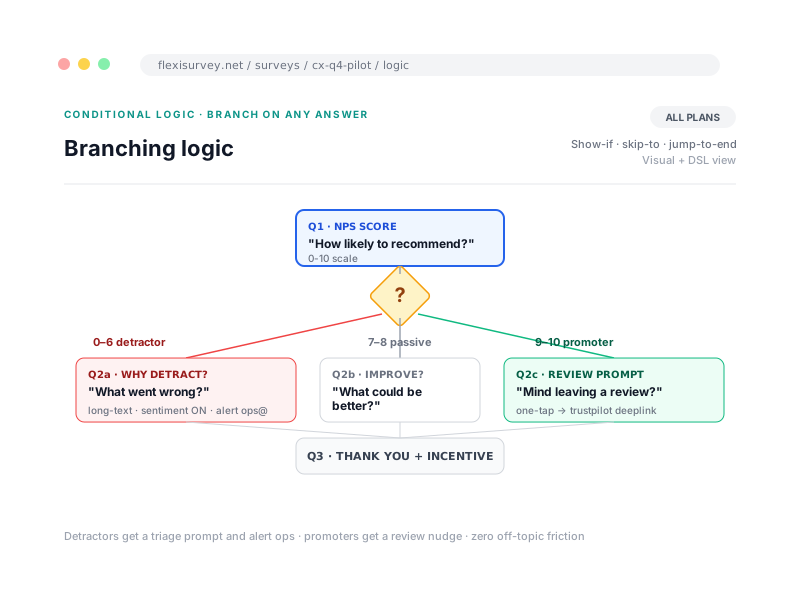
Create conditions from prior answers, respondent attributes and calculated scores. Group rules, control question visibility and validation, and preview the path before publishing. Because the same engine runs on submission, a question hidden by logic is never falsely flagged as a missing required answer, so completion and validation stay honest across complex routing.
- Show, hide, require and skip actions
- Nested conditions and reusable logic
- Page and option randomisation
- Test cases and preview links
Keep sampling controls inside the instrument
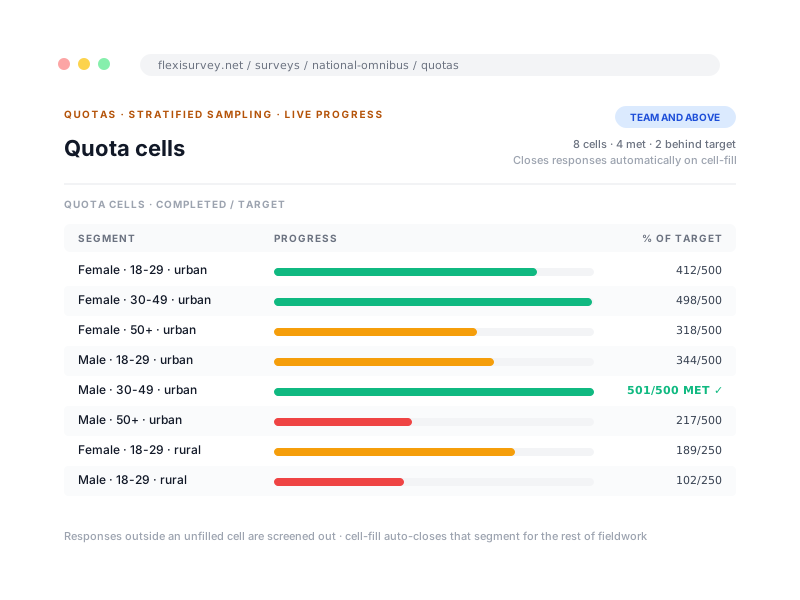
Define quota cells and monitor progress while data collection is active. Choose how the survey behaves when a target is reached, hard-block, soft-close or monitor only, and adjust a target without rebuilding the questionnaire. Piped values and computed variables let you personalise and score without leaving the builder.
- Hard, soft and monitoring-only quotas
- Segment-level targets
- Live completion counts
- Piped values and computed variables
Review the instrument with the right roles
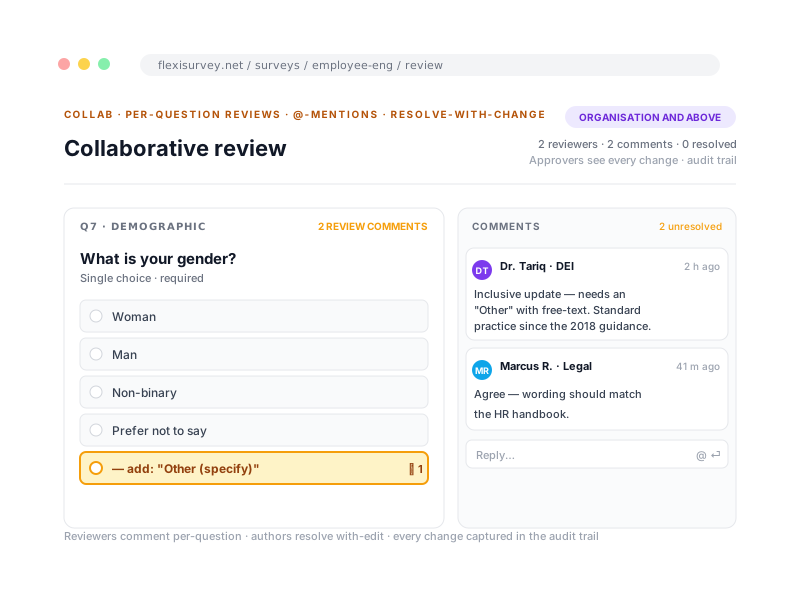
Give authors, reviewers, translators and analysts access appropriate to their task, and keep comments and decisions next to the question being discussed. Change history and version comparison show what moved between drafts, and an approval workflow is available where governance requires a sign-off before launch.
- Survey-scoped contributor roles
- Question-level comments and mentions
- Change history and version comparison
- Approval workflow available where required
Start from a verified template or blueprint
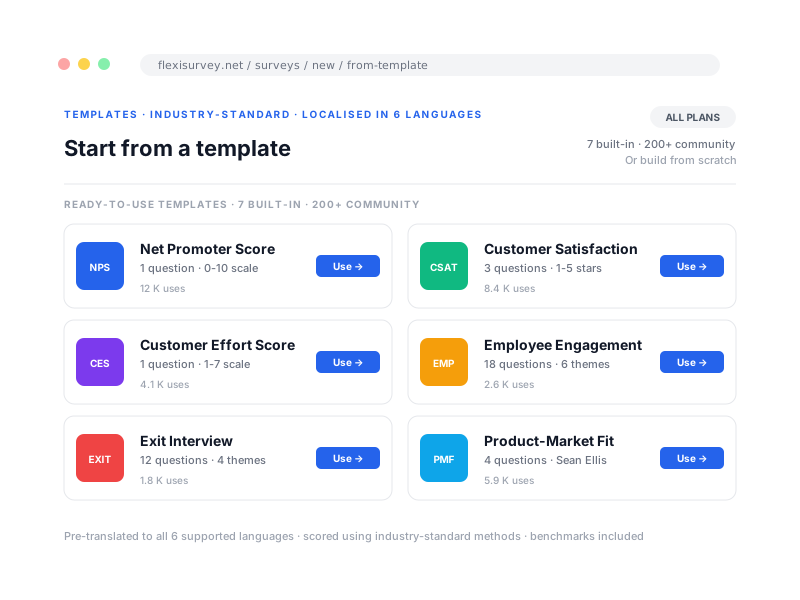
Use a template for a questionnaire pattern, or a blueprint for a larger project configuration that instantiates an entire pre-wired effort in one step. Over 60 survey templates and nine system project blueprints ship today, spanning research, NGO and field, public sector, CX, WASH, health-facility, humanitarian CFM, agriculture and fisheries, and your team can save any correctly-wired project as a reusable blueprint of its own.
- 60+ ready-to-use survey templates
- 9 turnkey project blueprints across sectors
- Clone and customise, templates are a starting point, not a cage
- Save your own as a reusable blueprint
Bring an existing questionnaire in, without retyping it
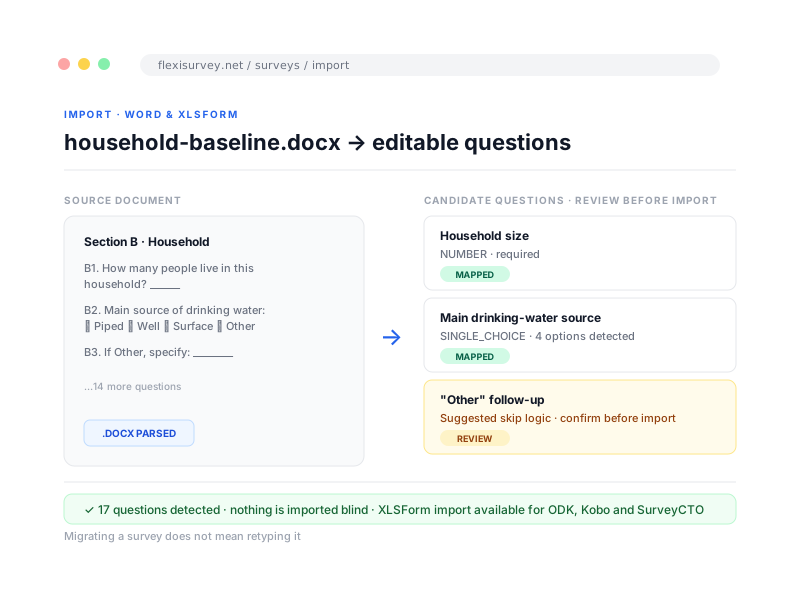
Bring an existing questionnaire in from a .docx file or pasted text and FlexiSurvey turns it into editable questions, so migrating a survey does not mean retyping it. Coming from ODK, KoboToolbox or SurveyCTO, import the XLSForm itself: groups, logic and translations arrive with a compatibility report, and nothing is imported blind.
- Convert a .docx or pasted draft into candidate questions
- Import an XLSForm from ODK, KoboToolbox or SurveyCTO
- Groups, logic and translations arrive with a compatibility report
- Review and adjust before publishing, nothing imported blind
How it works
The typical flow from setup to output.
Draft the instrument
Start from a template, a project blueprint or a blank canvas, and add blocks and questions in one builder.
Configure logic and quotas
Add branching, piping, randomisation, computed values and quota cells alongside the questions they govern.
Test with reviewers
Share a preview link, run test cases and gather question-level comments before anything reaches a respondent.
Approve and publish
Compare versions, capture an approval where required, and launch when the instrument is ready.
Plays well with
Adjacent capabilities and solution pages you might want to read next.
Build a sample instrument with our team
Bring a questionnaire and we will walk you through a real setup, logic, quotas, review and launch, in a live session.
Talk to our team