Multilingual delivery
Manage one instrument across languages
Keep source text, translations, review status and respondent language connected to the same survey, so adding a language does not create a separate project.

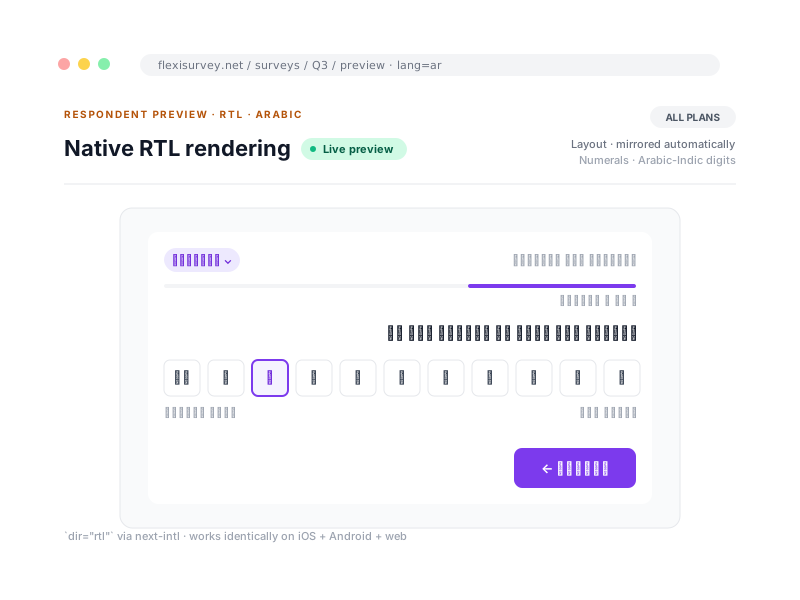
Most teams running cross-border studies stitch language together from spreadsheets, email threads and a separate translation vendor, then hope the version that reaches respondents matches the version they signed off. FlexiSurvey treats language as part of the instrument itself: every question and answer option carries its translations alongside the source, and the platform ships with English, Spanish, French, Portuguese, Chinese and Arabic built in, with right-to-left layout for Arabic across both the web survey and the native mobile apps.
Because translation lives with the survey rather than beside it, language follows the study end to end: into the field, through the respondent experience and back into analysis, where every response remembers the language it was answered in. You add a language once and it travels everywhere the survey goes, with an explicit review state so unfinished content never reaches a respondent.
What you can do
4 pillars, each one expanded further down with bullets and a screenshot.
Translation console
Per-string editor with full question context, import/export and translator-specific access.
Review states
Per-string, per-language Draft, Reviewed and Approved, with only approved content published.
Back-translation
Back-translation as a controlled review workflow, with similarity flags to prioritise, not replace, judgement.
Language-aware analysis
Every response records its language, so you can compare patterns and open text across locales.
Translate with the question context visible
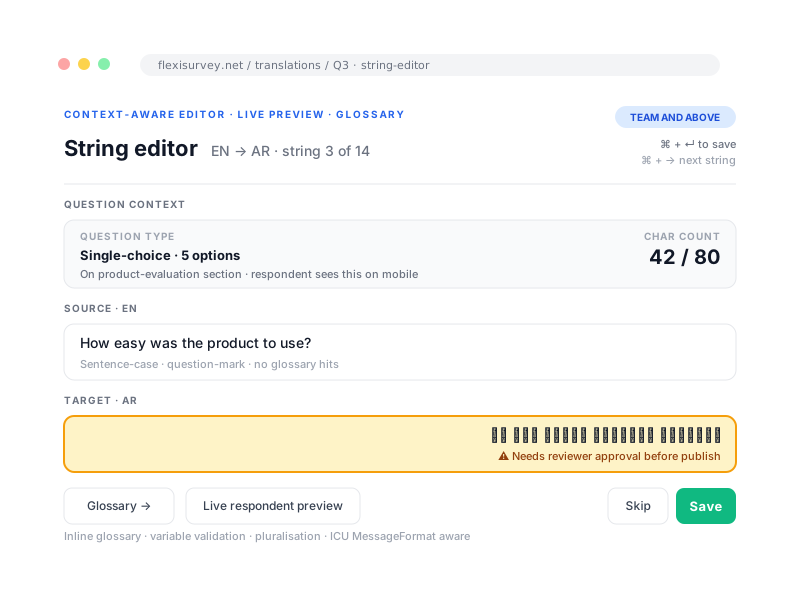
Translators work from a structured list of questions, options, help text and messages, with the surrounding questionnaire context in view so they are never guessing what an isolated phrase belongs to. The platform ships with six built-in languages, English, Spanish, French, Portuguese, Chinese and Arabic, and you can add custom respondent languages beyond them. If you already have translations, import them from a spreadsheet rather than retyping.
- Built-in interface languages: English, Spanish, French, Portuguese, Chinese, Arabic
- Add custom respondent languages beyond the built-in six
- Spreadsheet import and export
- Translator-specific access
Review before a language reaches respondents
Each string moves through explicit states, Draft, Reviewed and Approved, and only approved content is published by default, so a half-finished translation cannot leak into the field. Completeness indicators show how far each language has progressed, and when the source text changes you can compare versions to see exactly what needs re-review.
- Per-string and per-language status
- Reviewer and approval history
- Completeness indicators
- Version comparison after source-text changes
Support methodological translation review
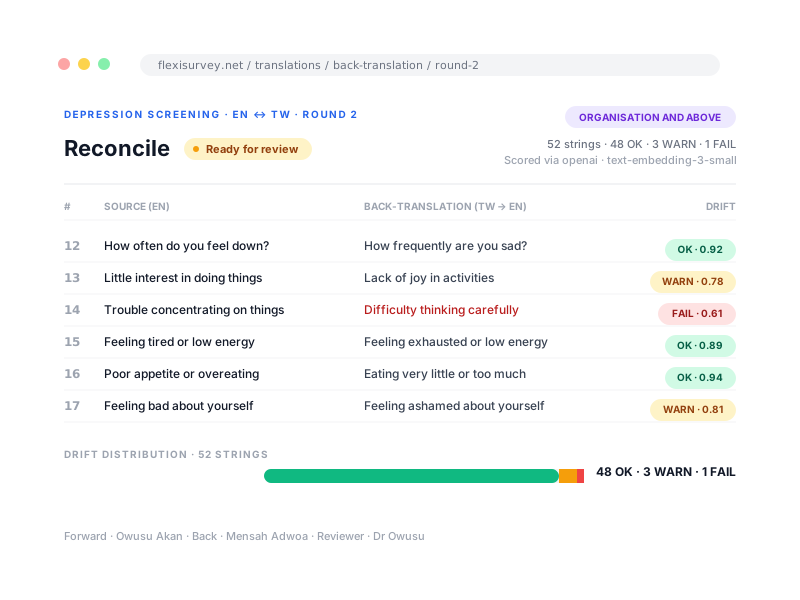
Where item equivalence has to be defensible, back-translation is handled as a controlled review workflow rather than an automated guarantee of equivalence. A second translator renders the target language back to the source, FlexiSurvey lays the two side by side, and each round is tracked as its own approved artefact. Automated similarity indicators may help prioritise review, but they do not replace linguistic or subject-matter judgement.
- Create a separate back-translation and compare it with the source
- Semantic drift is scored and flagged automatically, to prioritise expert review, never replace it
- Each round tracked and approved distinctly from the primary translation
- Available on Organisation and above
Preserve language through analysis
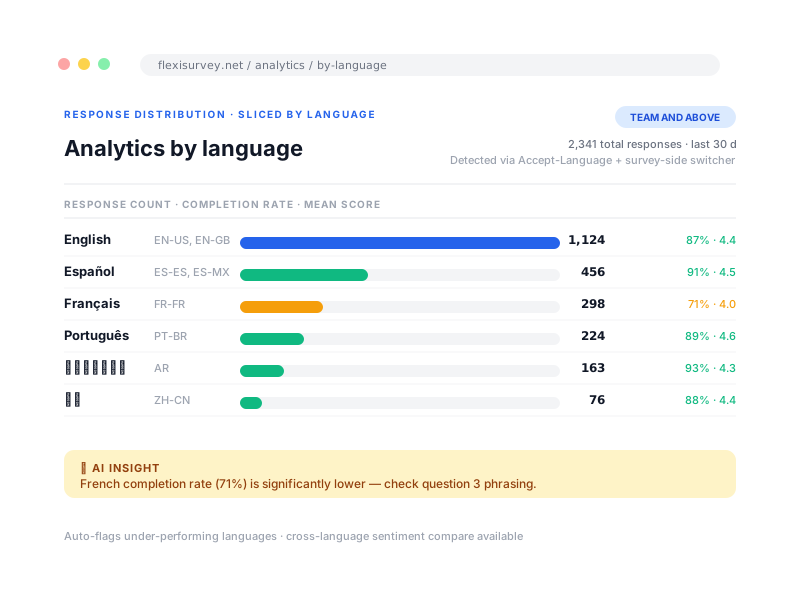
Each response records the language it was answered in, so analysts can compare response patterns, completion and open-text themes across locales rather than treating a multilingual sample as one undifferentiated pool. That makes it possible to spot a translation effect, a question that reads differently in one locale than another, before it quietly confounds your findings.
- Response language recorded on every submission
- Filter and slice results by language
- Compare completion and patterns across locales
- Surface possible translation effects early
How it works
The typical flow from setup to output.
Add a locale
Pick from the six built-in languages or add a custom one. An empty translation grid appears for every string.
Translate or import
Translators work in the console with full context, or you import existing translations from a spreadsheet.
Review and approve
Each string moves through Draft, Reviewed and Approved. Respondents only ever see the approved state.
Publish
Approved locales go live across web and field channels from the same instrument.
Analyse by response language
Every response keeps its language, so you can slice results and catch translation effects.
Plays well with
Adjacent capabilities and solution pages you might want to read next.
Review a multilingual instrument workflow
We will walk you through the translation console, the review states and back-translation, and Arabic right-to-left rendering, in a live demo.
Talk to our team